Saturday, March 3, 2012

Creating dummy data !!

Just going through oracle blogs, and got focus on below site...http://www.oracle-developer.net/display.php?id=515

Most of the times when you are practicing Oracle or Informatica code, you require a dummy data to be available at table. Particularly when you are working on Performance testing of oracle and informatica, large data is required. How will you create it ? One way is insert some records, then take union of it and again union of it. and so on.. But this will create repetation of data in your table..

Best way is below


Create table test as
SELECT ROWNUM                     AS id
       ,      MOD(ROWNUM,2000)           AS grp
       ,      DBMS_RANDOM.STRING('u',5)  AS val
       ,      DBMS_RANDOM.STRING('u',30) AS pad
       FROM   dual
       CONNECT BY ROWNUM <= 1000000;


Friday, February 17, 2012

Saving an error while DML statement...

It was an interview times, as our project went to tcs... every one was either facing some interview or preparing for the same.

Birwatkar was facing interview at CnC, and below was one of the question asked to him..

How to log errors while performing DML Operations through sql ?


1. First create source and target table
create table insertTestSourec
(
    id varchar(200)   
)


create table insertTestTarget
(id number
)

2. Create error log table using proc create_error_log
BEGIN
  DBMS_ERRLOG.create_error_log (dml_table_name => 'insertTestTarget');
END;

insert into insertTestSourec values(1)
insert into insertTestSourec values(2)
insert into insertTestSourec values('t')


insert into insertTestTarget
select * from insertTestSourec

Here, statement will get rollback and not a single record will get inserted into target table.

Check your error log table using below sql

select *
from all_tables
where table_name like upper('%insertTestTarget%')

3. Verify the error log table
insert into insertTestTarget
select * from insertTestSourec
LOG ERRORS INTO ERR$_INSERTTESTTARGET ('INSERT') REJECT LIMIT UNLIMITED;

4. Here, after execution of above statement, 2 records (1 and 2) will get inserted into target table and incorrect record will get inserted into ERR$_INSERTTESTTARGET.

select *
from ERR$_INSERTTESTTARGET

Thursday, January 5, 2012

Comparing Map and Folders
Ignore In Comparison at Lookup and tranferring that to other folder while migration
With clause query of date range for previous weeks monday - friday

Monday, December 5, 2011

XML Part - II

This is extension to link http://gogates.blogspot.com/2011/09/xml-source.html

We will first see the difference between the options we get while importing the XML definition.

Our XML source is like below taken from link -- http://www.w3schools.com/xml/xml_attributes.asp

<note>
  <date>
    <day>10</day>
    <month>01</month>
    <year>2008</year>
  </date>
  <to>Tove</to>
  <from>Jani</from>
  <heading>Reminder</heading>
  <body>Don't forget me this weekend!</body>
</note>

We used 2 options as seen in the screenshot

This is a first option as

This is a second option as

Basically it changes the xml source node column name. Please find the below difference of both cases


If you see, there is a difference in primary key name and main node name. Second has same name as of xml definition whereas first has name generated of its own.

Friday, December 2, 2011

Map and Session Relation

The relation between a Mapping and a Session is like a relationship between a groom and bride of a hindu family. As in Hindu family, unless you gave divorse to your privious wife or husband, you can not do another merriage, just like that unless you delete a map, you can not assign new map to particular session :) Yes re-namming the map will not do ;-)

We create a map say Map1 and create a session say Session1 and we assign Map1 to Session1 while creating it.


Scenario which I had faced.
Now, I have to do some new development at Map1, but before doing it, I took a copy of it say Map2 in same folder. I completed my development at Map1, but at the end of it, client said ealier thing was fine and he wants that only.

Now, I have Map2 as my original map and Map1 which I have edited. As I did number of changes, I thought its better to use Map2 instead of Map1. So, I renamed Map1 to Map1_Edited and Map2 to Map1.

I ran the session Session1 and surprizingly it got failed.  I checked for the root cause, and when I saw it was running Map1_Edited instead of Map1.

This means, session will stick to its firstly bonded map eventhough you change its name.

How to tackle this?
Now the option I had is to do changes in Map1_Edited itself, but changes were so big that it was a difficult task. I planed that, I will rename Map1 to Map1_Old and re-import Map1_Edited as Map1. So, I renamed Map1  to Map1_Old and exported both Map1_Old and Map1_Edited.

Now my correct map was Map1_Old which I renamed (I renamed the xml of it) and tried to  import it. But at the time of import, it showed me its old name as Map1_Old

Why ?
Thing is, when you rename the map xml, it did not actually renames its Map name but only the xml name.
How?
To rename its actual name, edit the xml and search for

Saturday, November 26, 2011

Basic Materialized View !!

Because of some reason, yesterday was re-creating / arranging my resume again. I was amazed when I came across certification section. Between Jan 2007 to Sep 2009 , in 2 years I had given SCJP, Oracle SQL, SCWCD, ITIL, , Oracle Pl-SQL, Oracle Fundamental-1, and lastly Oracle Fundamental - II, and the thing by which I amazed is, in year 2010 and 2011 I have not done any. :-( Reason was simple, I became satisfied, which kept me apart from learning and achieving more.

Today, went at Zensar Circle again. Met Sir (Ashish Jaiswal) and Sikku Bhai (Sikandar Shaikh), sir explained some things related to Partition Table and as always Sikku Bhai told, its 10 months over now, looking for job change..:) With sir's 30min lecture on Partition table and backup, I got motivated and thought about old days. Around 1, 1.5 years back, had tried number of things on Materialized view, and thought will do something on that before I go to bed...

taking the stuff from below link of "data warehousing guide 10g"-- give this words as search at google.

http://docs.oracle.com/cd/B19306_01/server.102/b14223.pdf

The basic difference I saw in data modeling of Oracle and Teradata is, Oracle advice to create Start Or SnowFlex schema structure and Teradata prefers 3NF. We do not have to bother about advances and dis-advances, both gives us job and money, so both are good.

Oracle uses Bit Map indexes which are mostly created on Fact tables. Below stuff is simply copied from page number 96 [6 - 2] of above link.


"The advantages of using bitmap indexes are greatest for columns in which the ratio of
the number of distinct values to the number of rows in the table is small. We refer to
this ratio as the degree of cardinality. A gender column, which has only two distinct
values (male and female), is optimal for a bitmap index. However, data warehouse
administrators also build bitmap indexes on columns with higher cardinalities.
For example, on a table with one million rows, a column with 10,000 distinct values is
a candidate for a bitmap index. A bitmap index on this column can outperform a
B-tree index, particularly when this column is often queried in conjunction with other
indexed columns. In fact, in a typical data warehouse environments, a bitmap index
can be considered for any non-unique column.
B-tree indexes are most effective for high-cardinality data: that is, for data with many
possible values, such as customer_name or phone_number. In a data warehouse,
B-tree indexes should be used only for unique columns or other columns with very
high cardinalities (that is, columns that are almost unique). The majority of indexes in
a data warehouse should be bitmap indexes.
In ad hoc queries and similar situations, bitmap indexes can dramatically improve
query performance. AND and OR conditions in the WHERE clause of a query can be
resolved quickly by performing the corresponding Boolean operations directly on the
bitmaps before converting the resulting bitmap to rowids. If the resulting number of
rows is small, the query can be answered quickly without resorting to a full table scan." I do not know, why in my old project not a single index was bit-map, thought the structure was Snow Flex..

Lets start with Materialized View now....
What is Materialized View and Normal View ?
Materiazlied view is just like normal view, only thing is it eats its own space at DB which normal view do not. Materialized view keeps its data at its own space wherein normal view always fetches the data from its base tables. Because of Query-Re-write, thought you fire select query on base tables, oracle will fetch the data from materialized view[ If its defined on base tables] and many more...we are not preparing for interview here, so its not important to find out anything more. If needed, go through Basic MV chapter from this book.

Creating materialized view using DB Link, i.e. base tables are in another db, and your MV is in different one -- I had tried it earlier and it was worked that time.. While reading this book came across the line
"If a materialized view is to be used by query rewrite, it must be stored in the same database as the detail tables on which it relies".. this means you can create it, but query re-write will not work, Will try this at end as I do not have another db created at home. Seems Query Re-Write will not work if we are using db link at select query of materialized view, need to check.

Note:- Only thing by which you can not define MV is
"You cannot, however, define a materialized view with a subquery in the
SELECT list of the defining query. You can, however, include subqueries elsewhere in
the defining query, such as in the WHERE clause."

e.g. Query should not be like


select id, name, (select address from myTable), age
from employee

This will not work... All tables has to be at where clause or from clause.


As per book there are 3 types of MVs

■ Materialized Views with Aggregates
■ Materialized Views Containing Only Joins
■ Nested Materialized Views

Some thing imp to read before we start creating MV --
If you specify REFRESH FAST, Oracle performs further verification of the query
definition to ensure that fast refresh can be performed if any of the detail tables
change. These additional checks are:
■ A materialized view log must be present for each detail table unless the table
supports PCT. Also, when a materialized view log is required, the ROWID column
must be present in each materialized view log.
■ The rowids of all the detail tables must appear in the SELECT list of the
materialized view query definition.
If some of these restrictions are not met, you can create the materialized view as
REFRESH FORCE to take advantage of fast refresh when it is possible. If one of the
tables did not meet all of the criteria, but the other tables did, the materialized view
would still be fast refreshable with respect to the other tables for which all the criteria
are met.

Materialized Join Views FROM Clause Considerations
If the materialized view contains only joins, the ROWID columns for each table (and
each instance of a table that occurs multiple times in the FROM list) must be present in
the SELECT list of the materialized view.
If the materialized view has remote tables in the FROM clause, all tables in the FROM
clause must be located on that same site. Further, ON COMMIT refresh is not supported
for materialized view with remote tables. Materialized view logs must be present on
the remote site for each detail table of the materialized view and ROWID columns must
be present in the SELECT list of the materialized view, as shown in the following
example.

CREATE MATERIALIZED VIEW LOG ON sales WITH ROWID;
CREATE MATERIALIZED VIEW LOG ON times WITH ROWID;
CREATE MATERIALIZED VIEW LOG ON customers WITH ROWID;
CREATE MATERIALIZED VIEW detail_sales_mv
PARALLEL BUILD IMMEDIATE
REFRESH FAST AS
SELECT s.rowid "sales_rid", t.rowid "times_rid", c.rowid "customers_rid",
c.cust_id, c.cust_last_name, s.amount_sold, s.quantity_sold, s.time_id
FROM sales s, times t, customers c
WHERE s.cust_id = c.cust_id(+) AND s.time_id = t.time_id(+);

Alternatively, if the previous example did not include the columns times_rid and
customers_rid, and if the refresh method was REFRESH FORCE, then this
materialized view would be fast refreshable only if the sales table was updated but not
if the tables times or customers were updated.

CREATE MATERIALIZED VIEW detail_sales_mv
PARALLEL
BUILD IMMEDIATE
REFRESH FORCE AS
SELECT s.rowid "sales_rid", c.cust_id, c.cust_last_name, s.amount_sold,
s.quantity_sold, s.time_id
FROM sales s, times t, customers c
WHERE s.cust_id = c.cust_id(+) AND s.time_id = t.time_id(+);


You can create a nested materialized view on materialized views, but all parent and
base materialized views must contain joins or aggregates. If the defining queries for a
materialized view do not contain joins or aggregates, it cannot be nested. All the
underlying objects (materialized views or tables) on which the materialized view is
defined must have a materialized view log. All the underlying objects are treated as if
they were tables. In addition, you can use all the existing options for materialized
views.
Using the tables and their columns from the sh sample schema, the following
materialized views illustrate how nested materialized views can be created.
CREATE MATERIALIZED VIEW LOG ON sales WITH ROWID;
CREATE MATERIALIZED VIEW LOG ON customers WITH ROWID;
CREATE MATERIALIZED VIEW LOG ON times WITH ROWID;

/*create materialized view join_sales_cust_time as fast refreshable at
COMMIT time */
CREATE MATERIALIZED VIEW join_sales_cust_time
REFRESH FAST ON COMMIT AS
SELECT c.cust_id, c.cust_last_name, s.amount_sold, t.time_id,
t.day_number_in_week, s.rowid srid, t.rowid trid, c.rowid crid
FROM sales s, customers c, times t
WHERE s.time_id = t.time_id AND s.cust_id = c.cust_id;

To create a nested materialized view on the table join_sales_cust_time, you
would have to create a materialized view log on the table. Because this will be a
single-table aggregate materialized view on join_sales_cust_time, you need to
log all the necessary columns and use the INCLUDING NEW VALUES clause.
/* create materialized view log on join_sales_cust_time */
CREATE MATERIALIZED VIEW LOG ON join_sales_cust_time
WITH ROWID (cust_last_name, day_number_in_week, amount_sold)
INCLUDING NEW VALUES;
/* create the single-table aggregate materialized view sum_sales_cust_time
on join_sales_cust_time as fast refreshable at COMMIT time */
CREATE MATERIALIZED VIEW sum_sales_cust_time
REFRESH FAST ON COMMIT AS
SELECT COUNT(*) cnt_all, SUM(amount_sold) sum_sales, COUNT(amount_sold)
cnt_sales, cust_last_name, day_number_in_week
FROM join_sales_cust_time
GROUP BY cust_last_name, day_number_in_week;

Nesting Materialized Views with Joins and Aggregates
Some types of nested materialized views cannot be fast refreshed. Use EXPLAIN_
MVIEW to identify those types of materialized views. You can refresh a tree of nested
materialized views in the appropriate dependency order by specifying the nested =
TRUE parameter with the DBMS_MVIEW.REFRESH parameter. For example, if you call
DBMS_MVIEW.REFRESH ('SUM_SALES_CUST_TIME', nested => TRUE), the
REFRESH procedure will first refresh the join_sales_cust_time materialized
view, and then refresh the sum_sales_cust_time materialized view.


================ First MV =======================

CREATE MATERIALIZED VIEW cust_sales_mv
PCTFREE 0 TABLESPACE demo
STORAGE (INITIAL 16k NEXT 16k PCTINCREASE 0)
PARALLEL
BUILD IMMEDIATE
REFRESH COMPLETE
ENABLE QUERY REWRITE AS
select sum(salary),count(emp.department_id), department_name
from hr.employees emp, hr.departments dep
where emp.department_id = dep.department_id
group by department_name

I fired above query, on hr schema and got an error
"insufficient privileges"

So, logged in as SYS, fired again and got an error
"table space demo does not exists"

What table space do sys user/schema has ?
Checked it at
select *
from DBA_TABLESPACES

or
  • USER_TABLESPACES
  • V$TABLESPACE
and found number of, so used "USERS" and modified the query


CREATE MATERIALIZED VIEW cust_sales_mv
PCTFREE 0 TABLESPACE users--demo
STORAGE (INITIAL 16k NEXT 16k PCTINCREASE 0)
PARALLEL
BUILD IMMEDIATE
REFRESH COMPLETE
ENABLE QUERY REWRITE AS
select sum(salary),count(emp.department_id), department_name
from hr.employees emp, hr.departments dep
where emp.department_id = dep.department_id
group by department_name

MV got created in 10 sec.

Fired select statement of MV and checked the Explain plan

It seems, Query re-wite worked and now data is getting fetched from MV and not from Base Tables.

Tuesday, November 22, 2011

connect by level !!

Every day teaches you something new,,, only thing is, you should keep your eyes open and ears alert.

While working on INC today, got something new like below - which I had never thought of.

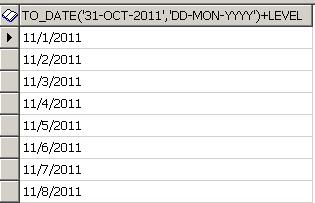
select to_date(startDate,'dd-mon-yyyy') - 1 + level
from dual
connect by level <= (to_date(endDate,'dd-mon-yyyy')+1) - to_date(startDate,'dd-mon-yyyy')

Scenario was, start date and end date are 2 IN parameters for my proc. Using those, they were generating date ranges. Lets say, you gave start date as 1-Nov-2011 and end date as 10-Nov-2011, So the query will generate 10 rows with 1st to 10 Nov as data.
As in image, query will generate the result.

How will it work?
Seems, there is a keyword connect by level just as connect by prior.

select  level
from    dual
connect by level <= 10 ;
 
When you fire above statement, it will 
generate records with 1 to 10 numbers.
 
Same logic they have used in generating Date Range series. Level they have creating 
by subtracting End Date and Start Date and simply added level to start date. As 
keeps on increase at every iteration, date gets increase along with it.
  
You can get more information at google, but following like I like most
http://www.sqlsnippets.com/en/topic-11821.html  

They query you can use for date series preparation is
select to_date('1-Nov-2011','dd-mon-yyyy') -1 + level 
from dual
connect by level <= (to_date('9-Nov-2011','dd-mon-yyyy')+1) - to_date('1-Nov-2011','dd-mon-yyyy')

Sunday, November 13, 2011

How do they do it - Part - 1

It may be very trivial or unimportant thing to most, but for me, it was a dream come true. I observed most of the people who do not work on HTML / UI Development, are really not interested in how do they create this UI, but not sure how, I am very fond of it.

After hearing much about jQuery and CSS, and observing www.bbc.com and www.google.org, I was wondering, how they have developed this site.
Just simply open these sites from FireFox browser - if you open those from IE you can see the html code but won't able to see the css behind those.

To start with, we will first see the www.bbc.com, which is full of css3 and jQuery. Image Rotation, Panels and number of things are with jQuery and definetly of css.

Here, we see how the right pan of bbc.com is made of...that is, when you scroll your mouse, numbering gets lighten.

Below is the basic code without applying css and it looks like below --

<html>   
    <div id="mostPopular_tabset_watched" class="selected panel">

           
        <ul class="blq-clearfix">
   
               
                <li class="ol0 first-child">
                    <a rev="mostpopular|homepage|na|r|t|i|text|content" href="http://www.bbc.co.uk/news/world-us-canada-15319106"><span class="livestats-icon livestats-1">1: </span>Mandar</a>                </li>

               
                <li class="ol1">
                    <a rev="mostpopular|homepage|na|r|t|i|text|content" href="http://www.bbc.co.uk/2/hi/8148527.stm"><span class="livestats-icon livestats-2">2: </span>Korea plane lands on its tail</a>                </li>

               
                <li class="ol2">
                    <a rev="mostpopular|homepage|na|r|t|i|text|content" href="http://www.bbc.co.uk/2/hi/asia-pacific/7874393.stm"><span class="livestats-icon livestats-3">3: </span>Australian pilot does a &#039;Hudson&#039;</a>                </li>

               
                <li class="ol3">
                    <a rev="mostpopular|homepage|na|r|t|i|text|content" href="http://www.bbc.co.uk/2/hi/programmes/click_online/9615908.stm"><span class="livestats-icon livestats-4">4: </span>Ceatec - pushing a touch screen&#039;s buttons</a>                </li>

               
                <li class="ol4">
                    <a rev="mostpopular|homepage|na|r|t|i|text|content" href="http://www.bbc.co.uk/news/video_and_audio/"><span class="livestats-icon livestats-5">5: </span>One-minute World News</a>                </li>

   
        </ul>

   
    </div>
</html> 


Wednesday, October 26, 2011

Viewing Old Map Version at Informatica....

If you are relying on Infomatica's versioning functionality - dependance is poor death. Had a very bad experience .. please read below...


Not sure, what was the day, most of the ppl were not in office. Got a new QC and RK assigned that to me. To start with exported the workflow and before importing to ravi's folder, just confirmed with him if someone else is using or not. After his Yes, imported workflow, and started working on new qc.


Process is, we have write access to user and poroject fodler but not for qa and prod. We need to export workflows from qa and import those to user folder. Have to complete development and testing at User folder and after UAT sign-off, we migrate code to project folder. From Project -->> QA -->> Prod pada will take care the migration process. PADA is a tool for migration.


Till 5, completed the 10% of work, went for the tea, came up by 5:30; that time got a ping from Sergey that when he tries to do testing for scenario, mapping is getting failed. Thought, my qc is not so urgent, so will help sergey to resolve the issue.


Went to feed, and checked from which folder his is running the mapping and felt like standing alone in desert, no water, and close to dye. :-(


Yes, I had imported my new code, where Mansi had did his development. I had replaced my all overlapping targets, sources, maps, tranformations in ravi's folder where mansi's code was there for UAT. All got messed now, and map got invalidated and because of which Sergey could not test the things.


Informed him that we have some issues at informatica level and trying to resolve those. As this situation was quite new to me, I asked help to dada (abhishek sengupta).


Below are the things we tried...


1. Checked for the versions, that what all objects got affected. But it was very hard to find it out, as numberof maps and source/targets were involved.
2. So, decided to go one by one with maps, which are affected. Took first map, checked the version..from the comment which I gave while importing, I could easy find out the affect maps.
3. To get the old version, I right click on respective version and click on Open In Workspace, and that particular map version got opened.
4. For first time, I felt my ass got saved, and I can re-commit this version, but when I checked the targets, it was still showing as latest version, it was not same as the map version.
5. I checked if really old target version is present at informatica, and went to targets and checked the versioning, yes that version was present,
6. I checked the dependancies for old target, it showed me map of that version.
7. I opened that map in workspace again, but no luck, again target was of latest version :-(..


This is a dam bug in informatica, that it shows everything of old version except the targets and because of which though you could see rest old part, its of no use.


Below is a replica of such scenario...
1. I am reducing the target table ports in my project folder map; keep in mind - only when your ports gets reduced, it will really affect the map as original ports will get dis-connected. When you add new ports, it will not affect the map.
2. Refresh the affected map, where this target got used.
3. Export the map and import it at QA folder. Replace all objects, so now QA will have also one target for which one port got deleted.
4. Check in all objects which you have newly imported to QA folder.
5. Now, right click on map and click on versioning --> View History
When you click on view history, new window will appar which will display you the total number versions exists till now.
6. Just again right click on object (here its map) of version you want, and click on Open In Workspace.


Here, all things work fine - means you will be able to view all objects in a map which belogs to that old verison, except target definition. This is a bug of informatica, that it wont show Target of that particular version but the target is always of latest version.

So, suppose you in-intentionally or un-knowingly copied your map or done some changes in map of a particular folder, and if the older version of that map got updated. Then you can view/get your old map iff the target defination is not changed.

If you have done some changes at target definition like added more columns, connected more ports to target level etc.. then there is no way to get your old version back, and you need to do your development again for earlier version.

Migration :-(

Ya, Migration was never so tedius, boaring and bugging job for me. It all depends on work you are doing. On the eve of Dipavali, I was all set to run for mumbai and never thought that simple migration will eat my time like anything.


It was a GT migration, as Nilesh was on leave it came on my head. Totally there were 7 workflows needs to be migrated. First time I saw that all workflows under particular folder are getting migrated. Though changes are in only 3 mappings not sure why do they migrate whole code :-(


Each workflow out of 7 has again 12 sessions each. Every sessions was of particular map, so 12 mapping for each session. Out of 12 mappings, 2 mappings were so big, that if you try to open those at Mapping Developer, it was getting hang. Those maps were having 15-16 pipelines each and number of tranformations. yes, that migration was really big.


Around 5 pm, started the migration, and had a plan pack the bags by 6 completing the migration and applying the label.
First Took export of all 7 workflows each and checked for verbose mode. Ya, that thing cs ppl do not like :-(. After getting clear on that, started importing one by one. As changes were not made by me, was very conscious while verifying each and every tranformations, especially targets and source. [THere is a separate nightmare of versioning, will describe it some other time]. For first successful import it took me 20 mins :). After that completed the second workflow which took another 20 mins. Clock's pointer were almost reaching 6, and this time Bikram asked me to call Nilesh again. As was already frustrated, without any hesitation I dialed Nilesh again. and asked him how much time the whole migration usually takes?
He first asked me, how you are doing the migration, one - by - one workflow? and obviouly the answer was Yes.
He started laughing, and said, first take the export by all 7 workflows simultaneously and import only one xml as mostly all trnaformations - source, targets, lookups, filters, expressiosn etc - are common.


* first lesson learned - if you are migrating such large number of workflows, took export of all at same time. As below


At Repository Manager
1. Select all workflows which needs to be migrated and go to repository menu and inside that click on export.


2. Save the wolething as a single xml, give anyname you want. e.g. 7_workFlow_Migration_26Oct.xml


3. Import that xml again, into project or qa folder. 
As you click on import, another window will get popup. Depending upon your requirement, select objects which you want to migrate. In my case, I had selected all objects. and click on next.


Another widow will get appear which will ask you to select the folder - source to destination. Tool is such claver, that it will pick source folder information from xml which you have exported from - hats of to the informaitca coders. For first time, destination folder will be same as source folder name - tool is still not able to read what's in your mind, wait for some more years.


After choosing correct source and destination folders, go ahead by click next. A new Window will ask you whether you want to checkin your new objects in new folder? Now here, Its a belief - its a belief as I never tried it - that if we checkin hear, comments which we give will not appear for checked in objects. So, as per advice by our seniors, please skip this step and do not click on check in.


To resolve the conflicts between objects, new window will appear which will ask you to create any rule if you want. I never came across any such need, so just skip this step and click next.
When you go to next window, here its an important task for decision. You need to resolve the conflicts here either you have to reuse, replace or rename the objects in new folder where you are copying into. In my case, as new folder was totally empty, its showing conflicts only for session properties. 
This is the last step which you will be follwing. and after it you just have to click on import button and all mappings, sessions, wokflow and tranformations inside it will get copied.
The story do not end here actually, after importing all objects, last task was to check-in all the objects with proper comment, so that we can identify what all objects we have imported.


If you observe, here ASA_QA folder is empty, even though we have imported the 3 workflows. Why? because those are not yet checked in. Now, once we check in those all objects, hopfully tool will work fine and will show the objects at QA folder.
give proper comment for objects you are checking in.
Once you checked in those, as per your expectations, tool do not work :). You need to re-connect to the repository and again need to open the QA folder. And now, you can view the things which you are expecting.

But, still my story do not end here, if you have observed, while importing, my all objects were in checked out status, but after importing and checkin in at QA, not a single object was impacted or invalid. Yes that thing you need to verify after you done with the import.

At the time of my migraion, means once I had imported all 7 workflows, one mapping was showing me as impacted. Initially I thought, because of my migration, map got impacted, so I went to map designer, checked it out, did the validation and again checked. I varified the comment just to verify if its been migrated from my user folder, and found the comment was missing. I checked for dependancing now and I could see number of dependant tranformations. "How will you check the dependancy --> just right click on map [or any object for that matter] and click on ' view dependancies..'.

Now I lost my temper, and cursying myself like anything, what went wrong I was not sure. I checked all objects [totally 130+] one by one, noted those which do not have comment which I gave while importing. Searched those missing comments objects at old user folder and found, those objects were not present. Eureka !! Got a clque, might be those sessions and mappings are not connected with those 7 workflows wich I had migrated. So, this time while checking the dependancing, I just click on workflow
Fortune favors the brave, and there were no results :). I had did my job correctly. Only thing I missed is, before importing the objects, I forgot to check if any object is checked-out, impacted or invalid in project or QA folder. Be sure you will verify that...
Now only thing, which was remaining was applying the label.

LABEL -- though not important for developers, but very crucial for ppl who are doing actual migration. Because from Stg --> QA --> Prod migration happens without humam intervation, automatically by tools like pvcs, or pada depending on company.
Go to versioning menu --> inside that Labels ..
After clicking on Label, new window will appear which will ask you to give lavel name which you want to create.
Just give appropriate label name and click on OK. imp: though at image label name is starting with number, it wont allow first character as number and it has to be alphabet. Now, you want to apply label to all workflows which you have migrated.  Thought in a folder, there are only 7 workflows, you are not supposed to add label on whole folder level, reason is, there can be number of objects which are not dependant on 7 workflows, and those will get migrated un-necessarily.
How will you apply label :- Select folder name which contains your workflows, go to Versioning -->Apply Label
Once you click on apply label, new window will appear as below
Click on Next, and window will appear where you want to select the objects for which you want to apply the label.
Here, do not select whole folder, but all required workflows.
Click on Add, and again Next. New windlow will appear where you will actually select the label which you are going to apply.
After selecting the required label, click on OK, give the meaningful comment, and do not forgot to check "Label All Chindren" and "Label All Parents". Click on finish and you are done with your job.
Just to verify, for how many objects label has been applied, you can create a query at informatica level.
Query :-- Go to tool at menubar and inside that click on queries..A new window will appear which will ask you to create new query as below
Give query name you want, select parameter - here I have selected as label, give the respective criteria.


 And shoot on blue arrow. You will get to see all objects which which this label got applied.


 Just verify how many objects you were actually migrated, and for how many objects the label got assigned. Note - label will get assigned only for latest checked in version of an object.

Before I end up - below are the things to always check at the time of migration
1. First verify at ur project/qa or developer folder any object is impacted, checkedout or invalid. If its so, first resolve that and then start for migration.
2. In case of large migration, do not do it one by one, rather take export of all worklows in single go and import all things in single go.
3. Do not checkin object while you are importing it, as comment will not appear in such cases if you do so.
4. After you imported all workflows/objects, please checkin those objects first.
5. Just re-verify if any of the object is impacted, checked out or invalid at project or qa folder.
6. Again write a query on the basis of comment, and count actual number of objects you were migrated and actualy numbr of objects for which comment has been assigned.
7. Once you confirm all above things, apply label only to those objects which you have actually migrated, be careful at this step.
8. Again write a query on basis of applied label and count number of objects again.

Hope this will help you..good luck

All about CSS

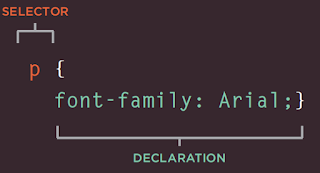
From book HTML & CSS - Design and Build Websites - Jon Duckett CSS works by associating rules with HTML elements. These rules govern how...